




Lenovo Chromebook Plus 14 review: This fanless gem lasts 15+ hours with a gorgeous OLED display
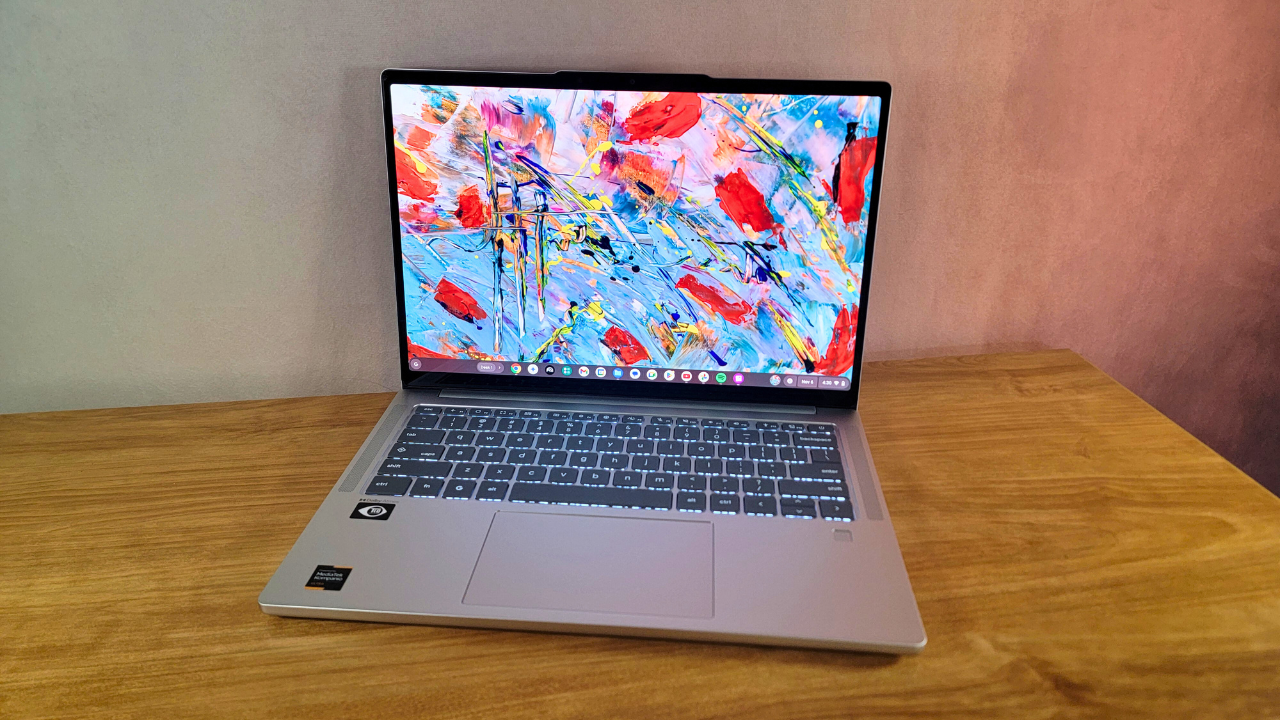

Put simply, the Lenovo Chromebook Plus 14 is a lightweight laptop boasting stellar battery life, impressive performance, and a fanless design that borderline rivals that of the MacBook Air. Especially for commuters, this is a Chromebook you’ll want to keep on your short list.
Diving deeper into the details, this laptop wowed me with features I didn’t think I’d ever see grace a Chromebook. Its built-in webcam is so sharp, I had to do a double-take when I saw my selfie. With its fanless design, it produces zero noise — and somehow, it doesn’t get hot. Then, it comes equipped with an OLED display. Yes, you heard that right. An OLED display on a Chromebook. And the colors on it look just as vibrant and punchy as I could’ve hoped.
As outstanding as some of these Chromebook features are, this little laptop isn’t without flaws. I was disappointed by its lackluster speaker quality for music, its outdated 60Hz refresh rate, and frankly, its high price tag.
When this laptop is on sale, it could be one of the best Chromebooks we’ve reviewed so far. When it’s not, it might be worth checking out the best laptops we’ve tested under $500 to find a better value.

Credit: Sarah Chaney / Mashable
Lenovo Chromebook Plus 14 price and specs
Generally speaking, most Chromebooks are cheaper than the average laptop. The Lenovo Chromebook Plus 14 is cheap for a laptop, but for a Chromebook, it’s one of the most expensive I’ve seen in recent years.
Our Lenovo Chromebook Plus 14 review unit is $749.99 via Best Buy and comes with the following specs:
-
MediaTek Kompanio Ultra 910
-
Integrated Arm Immortalis-G925 graphics
-
16GB RAM
-
256GB of UFS storage
-
14-inch FHD+ (1920 x 1200) OLED touch display
This configuration is also available for $749.99 at Lenovo, where you can find a slightly cheaper configuration as well. For $649.99, the Chromebook Plus 14 lowers RAM from 16GB to 12GB, decreases storage from 256GB to 128GB, and ditches the fingerprint reader and the display’s touch capability, but it keeps the same OLED panel and display resolution, the Kompanio Ultra 910 processor, and the integrated Immortalis-G925 graphics.
A fanless design that excites the ears but not the eyes
The Lenovo Chromebook Plus 14 is a well-built laptop with bland looks. It features a silver chassis (officially called seashell) with an aluminum top lid that does a decent, but not perfect, job at resisting fingerprints, and a plastic bottom half that’s a little creaky when pushed, but feels sturdy overall.

Credit: Sarah Chaney / Mashable
It’s certainly not an ugly Chromebook, but it’s not going to win any best-dressed awards either. Though it could be a shoo-in for a few other award categories. Measuring 12.4 x 8.6 x 0.6 inches and weighing just 2.8 pounds, it’s one of the lightest laptops we’ve tested to date. And with a great fanless design, it’s one of the quietest laptops we’ve reviewed.
A gorgeous display with one glaring weakness
Lenovo’s Chromebook Plus 14 features a 14-inch FHD+ (1920 x 1200) OLED touch display, which is rare to see on a Chromebook and is most likely the biggest reason for this laptop’s higher price tag.
The picture on this OLED panel is stunning, especially when brightness is maxed out at 400 nits. Taking photos of displays is difficult, but I think the photo I snapped of the abstract painting wallpaper shows off the display’s capability for vibrant, rich colors that aren’t overly saturated. The colors aren’t as vivid as some of the OLED panels I’ve seen on higher-end laptops, but c’mon, this is an OLED display on a $749 Chromebook, and it looks dang good for that price.

Credit: Sarah Chaney / Mashable
Unfortunately, the beauty of the Chromebook Plus 14’s colorful display is diminished slightly by its 60Hz refresh rate.
Of course, if you only plan to hop on the internet and stream content here and there, this borderline outdated refresh rate probably won’t bug you, and it does play a small role in extending battery life for this lightweight, travel-friendly Chromebook. However, if you want to use a Chromebook for cloud gaming or you want the display to be a bit easier on your eyes long-term, the 60Hz refresh rate may be a dealbreaker.
You may need to rely on wireless peripherals with this laptop
Chromebooks aren’t necessarily known for being powerful workstations, so the scant ports on the Lenovo Chromebook Plus 14 didn’t surprise me.

Credit: Sarah Chaney / Mashable

On the left side, you’ll find:
-
USB-A 3.2 Gen 1 port
-
USB-C 3.2 Gen 1 port
And on the right:
-
USB-C 3.2 Gen 1 port
-
Audio jack
This is a decent array of ports, but considering this is a premium Chromebook, it would’ve been nice to see at least one extra port thrown in, like an extra USB-A or -C port, a microSD card reader, or an HDMI port. That said, the laptop does get points for evenly doling out its USB-C ports to the left and right sides, a charging convenience not all modern laptops offer.
The speakers are okay for dialogue, but crummy for music
The Chromebook Plus 14 is fitted with four 2W speakers and Dolby Atmos audio tech, and I hated listening to music on this laptop. No matter which song I played, the audio was tinny and fatiguing, especially at louder volumes. Around 30 to 40 percent volume, listening to music wasn’t too annoying, but any louder, and my favorite songs were grating to my ears.
When watching content, the speakers sounded OK and fairly immersive, so they seem to perform better with speaking frequencies. But if you want to listen to music from this laptop, I’d definitely invest in a pair of the best headphones rather than rely on its built-in speakers.
A fairly enjoyable keyboard and trackpad combo
Typing on the Lenovo Chromebook Plus 14’s six-row chiclet keyboard is generally a pleasant experience. There’s satisfying feedback and an enjoyable clack with every keypress, and none of the keys feel mushy. I was actually able to type faster on this laptop than my daily driver, right out of the box.
The Quick Insert key is fantastic for accessing your clipboard, adding emoji quickly, inserting photos or other files into emails or documents, and getting help from Google AI with simple tasks. I also love the selection of functions in the top row, including keys for switching desk views, pulling up the accessibility menu, and starting dictation. That said, I did miss the Delete key’s presence as it’s one of my most-used keys.

Credit: Sarah Chaney / Mashable
The keyboard is backlit with simple white lights. You can manually adjust the brightness to your preferences, or set the Chromebook to automatically adjust keyboard backlight brightness based on your surroundings.
Moving on to the touchpad, it’s mostly smooth to operate, but with too much pressure or too quick movement, there’s a little stuttering to note. For the most part, it responds quickly and supports gestures accurately, but there were a few moments when the trackpad was slow to respond or required repeated movements before the cursor would go where I wanted it.
I wasn’t expecting this stellar webcam
Given the right lighting, the Chromebook Plus 14’s webcam is surprisingly impressive.
Laptop webcams in general are pretty disappointing, so I wasn’t expecting much from a Chromebook, as they’re cheaper than most laptops. But this laptop’s 5MP RGB camera delivered sharp quality, clearly defining small details like strands of silver hair framing my face, and accurate colors, superbly rendering my complexion, light green eyes, and the red brick wall behind me.

Credit: Sarah Chaney / Mashable
For privacy, there’s a physical shutter you can slide over the webcam when you’re not using it.
Lenovo Chromebook Plus 14 benchmarks and performance
The Chromebook Plus 14 delivers smooth overall performance. After firing up 20 Chrome tabs, the YouTube app, and the Spotify app simultaneously, there was minimal lag when loading new pages, switching apps, or working in cloud-based services like Google Docs and Sheets.
Once I hit 25 open tabs, I noticed a bit of lag when loading new pages, but it only added a few seconds to the load time. For a basic daily task load of answering emails, browsing the web with an average of 10 to 20 tabs open, and using simple apps, this laptop is a great pick.
I was worried this Chromebook’s fanless design might translate to throttled performance, but luckily, that’s not the case. This laptop manages to perform well with zero fans — and therefore zero fan noise — and it only gets a little warm during long periods of use, even when charging.
Like other Chromebook Plus models, this laptop comes with a free year’s worth of Google AI and a slew of built-in AI features to help you summarize text, edit your writing, and more. The ‘Help Me Read’ and ‘Help Me Write’ features work as intended and can definitely help if you have a lot of reading and writing tasks on your plate. That said, some AI features clearly still need a lot of work, like the AI tools in Gallery to remove and expand backgrounds, both of which delivered disappointing results.
We ran Geekbench 6 to measure the Lenovo Chromebook Plus 14’s overall performance compared to other Chromebooks in a more standardized way. Powered by a MediaTek Kompanio Ultra 910 processor, it earned a multi-core score of 7,680, making it our best-performing Chromebook at the time of testing, with the Acer Chromebook 516 GE (2025) trailing closely behind with a score of 7,660 on the same benchmark.
Lenovo Chromebook Plus 14 battery life
The Lenovo Chromebook Plus 14 lasted a respectable 15 hours and 45 minutes on a full charge during our standard battery test, which involves looping a 1080p video at 50 percent brightness and 50 percent speaker volume.
At the time of testing, the only Chromebook that surpasses this lengthy battery life is the Acer Chromebook Plus Spin 514, which notched 18 hours and 11 minutes on the same battery test. These two Chromebooks share most of the same specs, but the Acer Chromebook has an IPS display, and the Lenovo Chromebook has an OLED display. That display variation is likely the only reason for this slight difference in results.
Is the Lenovo Chromebook Plus 14 worth it?
The Lenovo Chromebook Plus 14 has a lot going for it: a battery that lasts nearly 16 hours, a gorgeous OLED display that’s a rarity for Chromebooks, stellar performance despite a quiet, fanless design, a satisfying keyboard, and a webcam that has no business being this good on such an affordable laptop. Plus, it’s stupid lightweight, so it’s a fantastic companion for traveling or commuting.
For all those reasons, I think the Chromebook Plus 14 is definitely worth it for anyone in need of a simple, ChromeOS-powered daily driver for school, work, or personal needs. However, I’d recommend waiting for a sale because its $749 sticker price is too much.
Though Lenovo’s Chromebook Plus 14 is a fantastic laptop for some, I don’t think it’s the best Chromebook for everyone. If you want to use it for cloud gaming, its display being capped at 60Hz will be a major nuisance. If you want to jam out to your favorite songs without headphones, you’ll likely be disappointed by its tinny, fatiguing speakers. And if you have a big collection of wired peripherals you want to use, its minimal port setup might not be the best fit for you.
Otherwise, this is a great little Chromebook for most people, and it’s definitely worth considering.


Related Articles


Build a pipeline and close deals with an exhibit table at TechCrunch Disrupt 2026
Get an unmatched ROI by exhibiting your startup in front of 10,000...
Uber Eats’ new Cart Assistant feature is an AI hack for your grocery shopping
If there’s any area of your life that you might be willing...
TikTok launches an opt-in Local Feed in the U.S. leveraging users’ precise location
TikTok’s new Local Feed will show you nearby shopping, dining, events, news,...
Grab this 75-inch Insignia QLED TV for less than $500 at Best Buy
Looking to upgrade your home theater on a tight budget? Right now...
Leave a comment